 Leadline Inc.
LS-01: Database Encryption at Rest
Encryption of sensitive system data within databases while at rest using AWS RDS encryption
Control Description
Sensitive system data within the databases related to the in-scope applications is encrypted while at rest.
Plain Meaning
This control requires that all sensitive data stored in databases must be encrypted when the data is not actively being processed (at rest). This protects sensitive information from unauthorized access even if the database files are compromised.
Implementation with AWS RDS Encryption
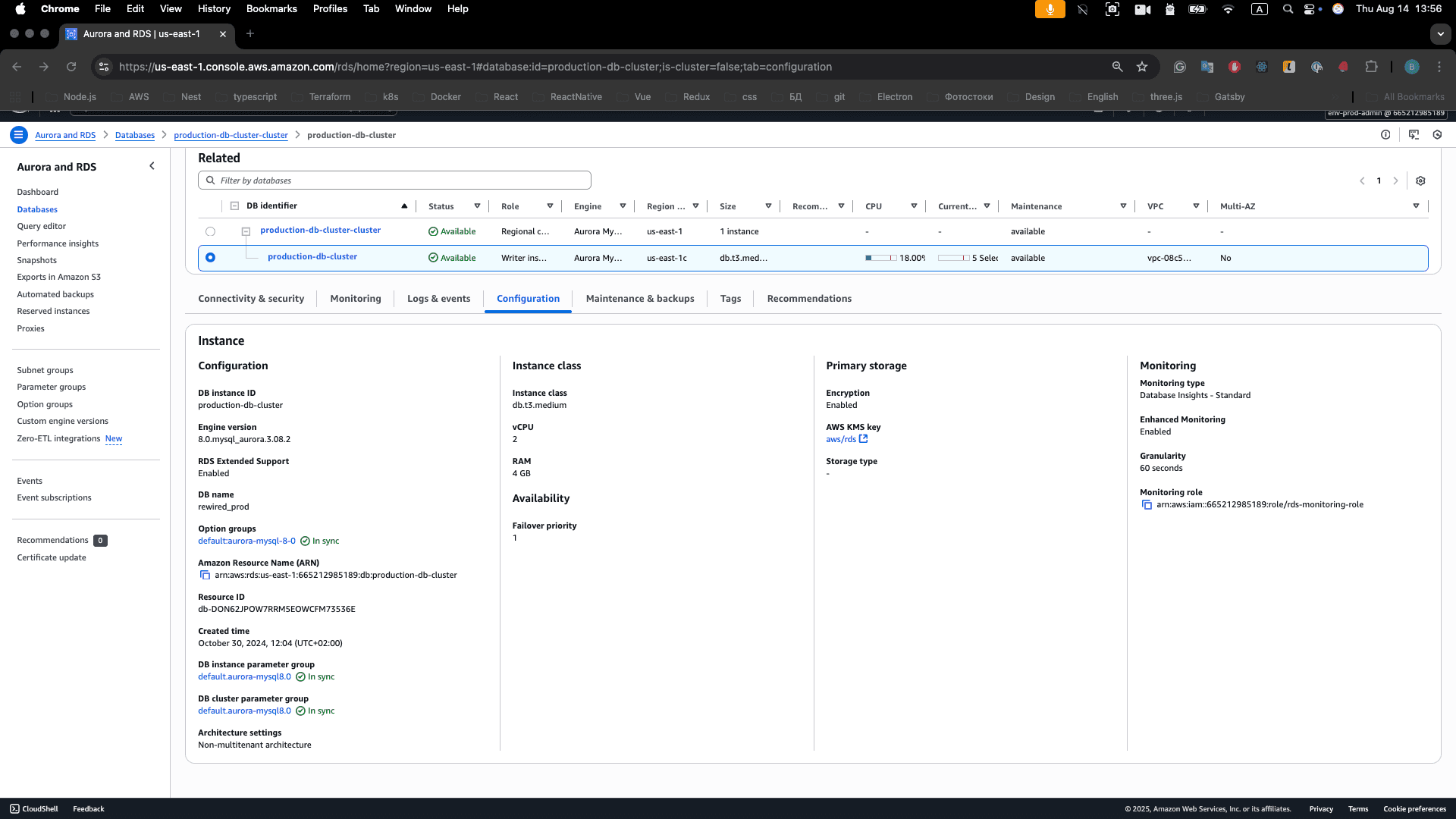
Primary Solution: Amazon RDS Encryption
We utilize Amazon RDS encryption to provide comprehensive data protection for all our database instances. AWS RDS encryption uses the industry standard AES-256 encryption algorithm to encrypt data at rest, including underlying storage, automated backups, read replicas, and snapshots.
Encryption Overview
According to the AWS RDS encryption documentation, Amazon RDS encrypted DB instances provide an additional layer of data protection by securing our data from unauthorized access to the underlying storage. This helps fulfill compliance requirements for encryption at rest.
What Gets Encrypted
- DB Instance Storage: All data stored in the database
- Automated Backups: All automated backups are encrypted
- Read Replicas: All read replicas inherit encryption
- Snapshots: All manual and automated snapshots
- Logs: Database logs and audit trails
AWS RDS Encryption Configuration
KMS Key Management
AWS RDS uses AWS Key Management Service (KMS) to manage encryption keys. We have two options:
1. AWS Managed Key (Default)
AWS provides a managed key for RDS encryption that is automatically rotated and region-specific. This option provides basic encryption without additional key management overhead.
2. Customer Managed Key (Recommended)
Customer managed keys provide better control and audit capabilities. These keys can be created and managed through AWS KMS with custom policies and automatic rotation enabled.
Database Instance Encryption Setup
Creating Encrypted DB Instances
When creating new RDS database instances, encryption must be enabled during the creation process. This includes specifying the KMS key to use for encryption and ensuring all storage is encrypted.
Encryption Verification
Encryption status can be verified through the AWS Management Console by checking the Configuration tab of the database instance, or through AWS CLI commands that return the encryption status.
Encryption in Transit
Automatic Encryption
According to the AWS RDS documentation, all data flowing across AWS Regions over the AWS global network is automatically encrypted at the physical layer before it leaves AWS secured facilities. All traffic between Availability Zones is encrypted.
Additional Encryption Layers
SSL/TLS Encryption
Database connections can be configured to require SSL/TLS encryption for additional security. This ensures that all data transmitted between applications and databases is encrypted.
Instance-to-Instance Encryption
For supported instance types, AWS provides automatic encryption between instances using Authenticated Encryption with Associated Data (AEAD) algorithms with 256-bit encryption.
Database Engine-Specific Encryption
MySQL Encryption
MySQL supports table-level encryption that can be enabled for specific tables containing sensitive data. This provides an additional layer of encryption beyond the storage-level encryption provided by RDS.
PostgreSQL Encryption
PostgreSQL supports column-level encryption through extensions like pgcrypto, allowing for selective encryption of sensitive data fields within tables.
Backup and Snapshot Encryption
Automated Backups
All automated backups inherit the encryption settings of the source DB instance, ensuring that backup data is protected with the same level of encryption.
Manual Snapshots
Manual snapshots can be created with encryption enabled, using either the same KMS key as the source instance or a different key for additional security.
Cross-Region Snapshot Copy
When copying snapshots between AWS regions, encryption is maintained throughout the process using envelope encryption to protect data during transit.
Compliance and Monitoring
SOC 2 Compliance Mapping
- CC6.1: Logical and physical access controls
- CC6.2: Prior authorization for access
- CC6.3: System and data access monitoring
- CC6.4: Access removal and modification procedures
Encryption Monitoring
CloudWatch metrics can be used to monitor encryption status and KMS key usage. CloudTrail provides comprehensive logging of all encryption-related activities, while KMS usage tracking enables alerts for key-related events.
Audit and Compliance Evidence
- KMS Key Usage Logs: Complete audit trail of key usage
- RDS Configuration Logs: Database encryption configuration history
- Backup Encryption Verification: Proof of encrypted backups
- Snapshot Encryption Status: Verification of snapshot encryption
Security Best Practices
Key Management
- Use Customer Managed Keys: Provides better control and audit capabilities
- Enable Key Rotation: Automatic key rotation for enhanced security
- Restrict Key Access: Implement least-privilege access to KMS keys
- Monitor Key Usage: Track and alert on key usage patterns
Database Security
- Enable Encryption at Creation: Cannot enable encryption after instance creation
- Use Latest Engine Versions: Ensure support for encryption features
- Regular Security Updates: Keep database engines updated
- Access Control: Implement proper database access controls
Backup Security
- Encrypted Backups: All backups inherit encryption settings
- Secure Backup Storage: Use encrypted S3 buckets for backup storage
- Backup Access Control: Restrict access to backup files
- Regular Backup Testing: Test backup restoration procedures
Limitations and Considerations
RDS Encryption Limitations
According to the AWS RDS documentation, the following limitations apply:
- Encryption at Creation Only: Can only encrypt DB instances when creating them
- Key Change Restrictions: Cannot change KMS key after instance creation
- Snapshot Encryption: Snapshots must use same KMS key as source instance
- Read Replica Requirements: Read replicas must match source encryption status
- Cross-Region Limitations: KMS keys are region-specific
Related Controls
Encryption Controls
- DS-01: Removable Media Encryption: Encryption of removable media devices
- DS-03: Data Classification and Handling: Data classification and encryption requirements
- DS-05: Secure Data Transmission: Encryption in transit requirements
- BDR-09: Backup Encryption: Backup data encryption implementation
Access Management
- LS-04: Access Authorization: Database access authorization
- LS-05: Access Review: Regular access reviews for database access
- LS-07: Privileged Access Management: Privileged database access controls
- LS-16: Encrypted Transmissions: Network encryption for database connections
Backup and Recovery
- BDR-04: Backup Procedures: Database backup procedures
- BDR-06: Data Retention and Destruction: Database data retention policies
- BDR-07: Backup Storage and Security: Secure backup storage for databases
Monitoring and Logging
- COM-02: Centralized Logging Solution: Database activity logging
- COM-08: Quarterly Internal Network Scans: Database security scanning
Related Links
Leadline Architecture Design
- SSDLC Security Practices: Security toolchain and secure development practices for database security
- Observability & Monitoring: Monitoring and logging for database performance and security
AWS Resources
RA-03: Annual Risk Assessment of Laws and Regulations
Annual risk assessment including identification and assessment of applicable laws, regulations, SLAs, and vendor-related threats
LS-04: External User Account Management
Approval process for external user account changes or user entity responsibility for access controls